redis
Tung Bui Thanh (TungDaDev)26 mins read
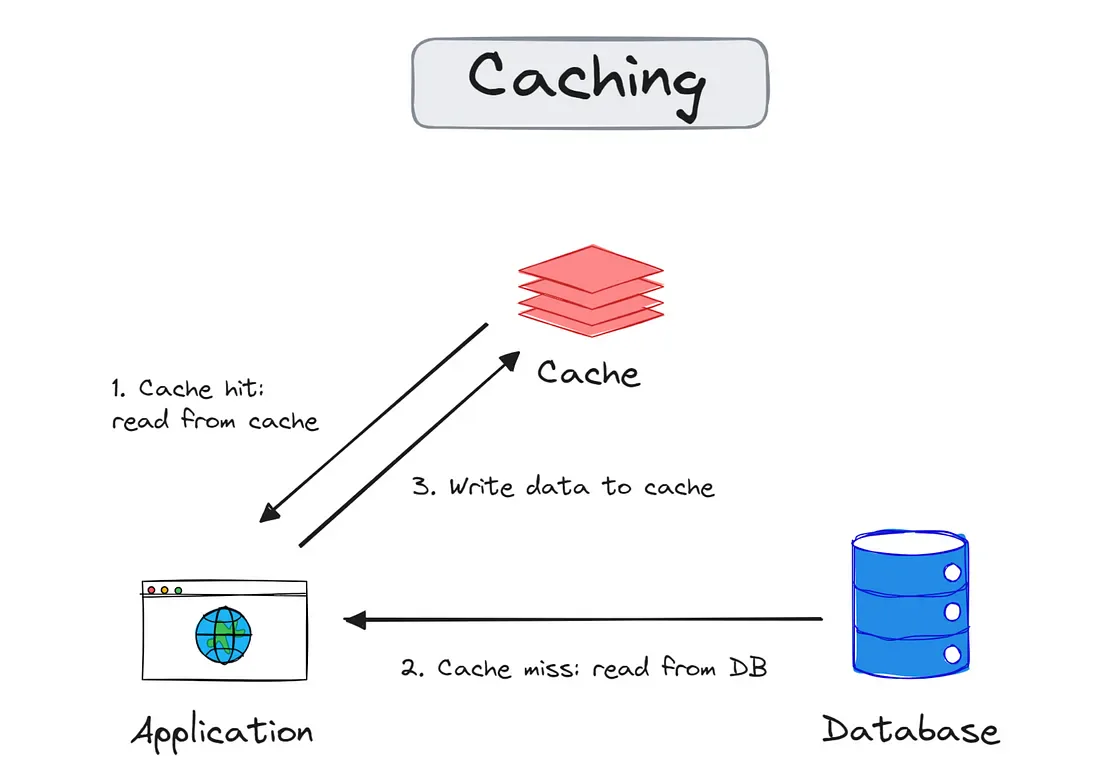
Redis (Remote Dictionary Server) hay bị đóng khung trong vai "bộ nhớ đệm" (cache). Thật ra với hệ thống chịu tải cao, Redis là một engine xử lý cấu trúc dữ liệu trên RAM với độ trễ dưới một mili giây, làm nền cho đủ thứ pattern: rate limiting, message queue, cho tới event sourcing.
Mình sẽ nói về cách Redis chạy bên trong trước, rồi tới mấy mẹo tiết kiệm RAM, cuối cùng là các pattern hay gặp khi dùng Redis trong hệ thống phân tán.
# bản chất
Redis nhanh nhờ hai thiết kế cơ bản: In-memory và Single-threaded.
Toàn bộ dữ liệu nằm trên RAM nên đọc/ghi có độ trễ rất thấp. Lệnh được thực thi trên một luồng duy nhất, nên Redis không tốn chi phí chuyển ngữ cảnh (context switching) giữa các lệnh và không phải lo race condition bên trong, khỏi cần lock phức tạp. Từng lệnh riêng lẻ luôn atomic. Còn một chuỗi nhiều lệnh (GET rồi SET chẳng hạn) thì không, muốn atomic phải dùng MULTI/EXEC hoặc Lua script.
Để phục vụ hàng chục nghìn kết nối trên một luồng, Redis dùng I/O multiplexing (epoll trên Linux, kqueue trên macOS/BSD): một vòng lặp sự kiện hỏi hệ điều hành "socket nào đang có dữ liệu" rồi xử lý lần lượt, không cần mỗi kết nối một thread.
Một chi tiết hay bị bỏ qua: từ Redis 6, phần đọc/ghi socket có thể chạy trên nhiều thread (io-threads), còn phần thực thi lệnh vẫn đơn luồng. Nên câu "Redis single-threaded" chỉ đúng với phần xử lý lệnh.
# data structures
Redis không chỉ là key-value đơn giản, nó có nhiều cấu trúc dữ liệu native:
| Structure | Ví dụ | Use case |
|---|---|---|
| String | SET user:1 "John" | Cache, counter, session |
| Hash | HSET user:1 name "John" age 30 | Object storage |
| List | LPUSH queue task1 | Message queue, timeline |
| Set | SADD tags "java" "redis" | Unique collections, tagging |
| Sorted Set | ZADD leaderboard 100 "player1" | Ranking, rate limiting |
| Stream | XADD events * key value | Event sourcing, log |
| HyperLogLog | PFADD visitors "user1" | Counting unique (approximate) |
| Bitmap | SETBIT active:20240101 userId 1 | Flags, daily active users |
| Geospatial | GEOADD stores lon lat name | Location-based queries |
# cách xử lý request
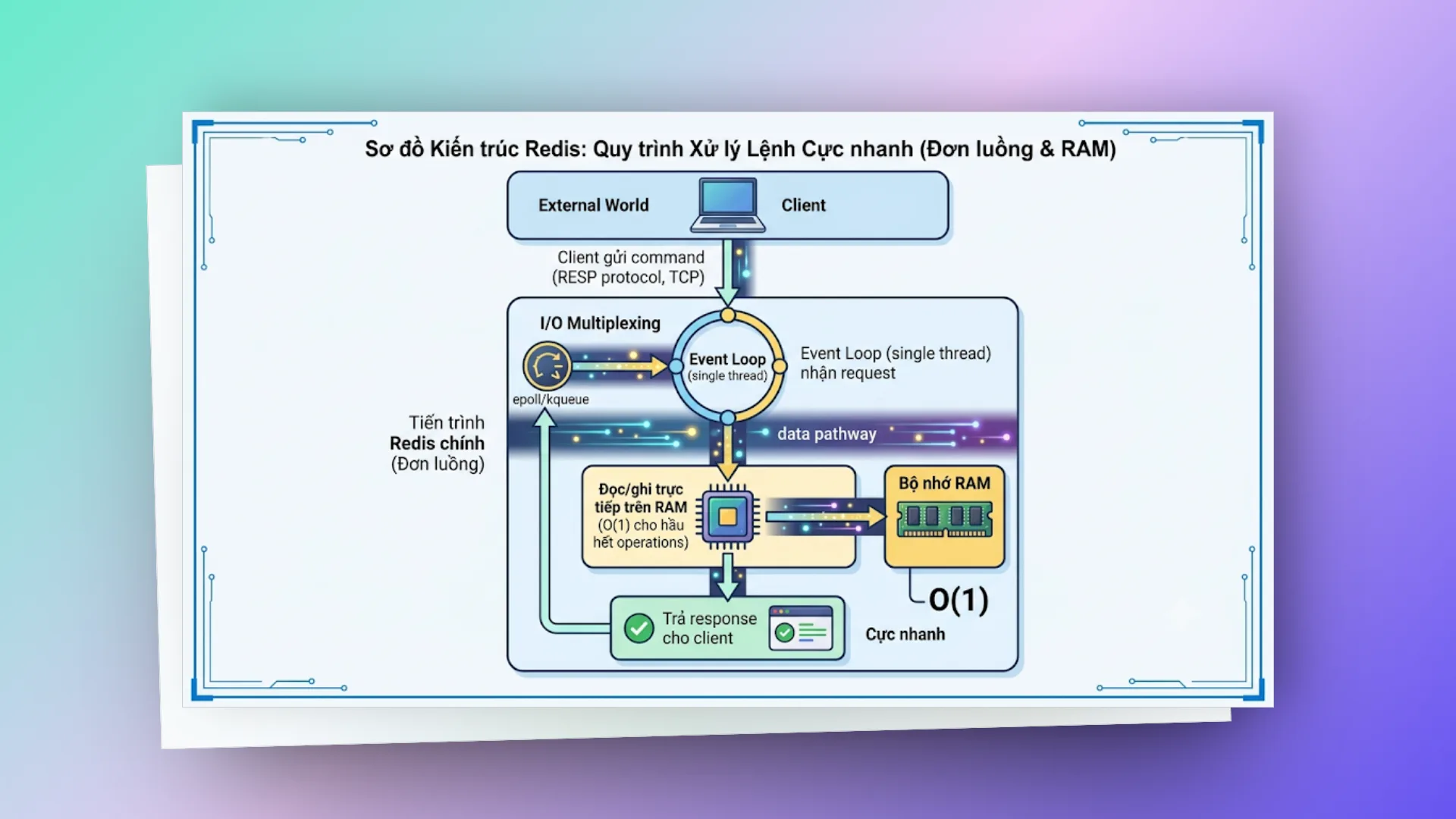
Single-threaded nghĩa là các command được xử lý tuần tự, mỗi command là một khối atomic. Không có 2 command nào chạy đồng thời trên cùng data. Hệ quả ngược lại là một lệnh chậm (KEYS *, HGETALL trên hash cả triệu phần tử, Lua script dài) sẽ bắt mọi client khác chờ.
# persistence (tuỳ chọn)
Redis có 2 cơ chế ghi xuống disk:
- RDB (snapshotting): chụp toàn bộ dataset theo chu kỳ (vd: mỗi 5 phút). Redis
fork()một process con để ghi snapshot, nhờ copy-on-write nên process chính vẫn phục vụ bình thường, nhưng với dataset lớn thì lúc fork có thể khựng vài chục mili giây và tốn thêm RAM cho các trang bị ghi đè. Restore nhanh, nhưng có thể mất data giữa 2 snapshot. - AOF (Append Only File): ghi log mọi write operation. An toàn hơn (
appendfsync everyseclà mặc định, mất tối đa khoảng 1 giây dữ liệu), nhưng file lớn hơn và restore chậm hơn. Redis định kỳ rewrite AOF để file không phình mãi.
Có thể dùng cả 2 cùng lúc. Hoặc tắt hết nếu chỉ dùng làm cache thuần.
# expiration (TTL)
SET session:abc123 "data" EX 3600 # tự xóa sau 1 giờ
Redis dùng 2 chiến lược xóa key hết hạn:
- Lazy: kiểm tra khi client truy cập key, hết hạn thì xoá luôn và trả về như không có
- Active: định kỳ lấy mẫu ngẫu nhiên một nhóm key có TTL, xoá những key đã hết hạn; nếu tỉ lệ key hết hạn trong mẫu còn cao thì lặp lại ngay
Vì vậy key hết hạn không biến mất đúng từng giây, nó có thể còn nằm trong RAM một lúc cho tới khi bị lấy mẫu trúng hoặc bị truy cập.
# replication & high availability
- Master-Replica: replica copy data từ master theo kiểu bất đồng bộ (async). Scale đọc bằng cách đọc từ replica, đổi lại có thể đọc phải dữ liệu cũ vài mili giây.
- Redis Sentinel: monitor master, tự động failover khi master chết, promote replica lên master.
- Redis Cluster: sharding data qua 16384 hash slot (
CRC16(key) mod 16384), phân tán trên nhiều node. Scale cả read lẫn write. Lệnh đụng nhiều key (MGET, Lua, MULTI) chỉ chạy được khi các key nằm cùng slot, nên hay phải dùng hash tag kiểu{user:1}:profile,{user:1}:cart.
# pub/sub & streams
- Pub/Sub: fire-and-forget messaging. Subscriber không nhận được message nếu lúc đó offline.
- Streams: message log lưu bền (giống một bản Kafka thu nhỏ). Có consumer group, acknowledgment, replay từ bất kỳ ID nào.
# tại sao nhanh
- Data trong RAM (không disk I/O cho read/write)
- Single-threaded (không context switch, không lock)
- I/O multiplexing (epoll/kqueue xử lý hàng nghìn connections trên 1 thread)
- Efficient data structures (listpack, intset, quicklist cho small data; listpack thay ziplist từ Redis 7)
- RESP protocol đơn giản, parse nhanh
# limitations
- Bị giới hạn bởi RAM (dataset phải fit trong memory)
- Single-threaded cho commands (CPU-bound operations như Lua script phức tạp sẽ block)
- Eventual consistency ở replica (async replication có thể mất data khi master crash; lệnh
WAITgiảm rủi ro nhưng không biến Redis thành hệ strongly consistent) - Không có query language phức tạp (không JOIN, không aggregate như SQL)
# memory optimization
RAM đắt. Bớt được byte nào trong dữ liệu là đỡ tiền hạ tầng chừng đó, hệ thống cũng ổn định và ít phân mảnh hơn.
# kỹ thuật ziplist
Cùng một lượng dữ liệu, cách tổ chức quyết định mức hao phí. Mỗi key top-level trong Redis kéo theo một entry trong dictionary chính, một object header, con trỏ, thông tin TTL... cỡ vài chục byte overhead. Lưu 1 triệu user profile bằng String (mỗi field một key) thì phần overhead này còn lớn hơn cả dữ liệu thật. Dùng Hash nhỏ thì Redis tự chọn encoding gọn: các field nằm sát nhau trong một vùng nhớ liên tục, không có con trỏ hay hashtable. Mức tiết kiệm tuỳ dữ liệu, thường được vài lần.
Encoding này tên cũ là ziplist, từ Redis 7 đổi thành listpack (tên config *-ziplist-* vẫn được nhận như alias). Ngưỡng mặc định để giữ được nó:
- hash-max-listpack-entries 128 (trước Redis 7: hash-max-ziplist-entries)
- hash-max-listpack-value 64 (trước Redis 7: hash-max-ziplist-value)
Vượt một trong hai ngưỡng là hash bị chuyển sang hashtable và không quay lại. Đổi lại, thao tác trên listpack là O(N) (phải quét tuần tự), nên đừng đẩy ngưỡng lên quá cao.
# kỹ thuật hash bucketing
Khi số key lên tới hàng triệu, nên gom nhóm lại: tách ID thành các bucket (ví dụ chia ID cho 1000). Cách này giảm số key top-level, nhét nhiều giá trị vào một Hash nhỏ còn giữ được encoding listpack. Ví dụ nổi tiếng là Instagram: họ gom ~300 triệu cặp media ID → user ID vào bucket 1000 phần tử, nâng ngưỡng ziplist lên 1000, và RAM giảm từ khoảng 70MB xuống 16MB cho mỗi 1 triệu cặp (bài gốc). Nếu có 10M keys dạng user:{id}, nhóm lại thành hash buckets:
# Thay vì 10M keys:
SET user:1234567 "data"

# Nhóm theo bucket (chia id cho 1000):
HSET user_bucket:1234 567 "data"
# → Giảm từ 10M keys xuống 10K hash keys, mỗi hash ~1000 entries
# → Phải nâng hash-max-listpack-entries lên >= 1000 thì hash mới giữ listpack
# → Mức tiết kiệm tuỳ kích thước value, value càng nhỏ càng lợi
Lưu ý: nếu bucket vượt hash-max-listpack-entries (mặc định 128), Redis chuyển hash sang hashtable và mất lợi thế. Hoặc chọn bucket nhỏ hơn ngưỡng (chia cho 100), hoặc nâng ngưỡng như Instagram. Pattern này hợp với value nhỏ, đơn giản; bạn mất khả năng đặt TTL riêng cho từng phần tử (trước Redis 7.4 hash chưa có TTL theo field).
# key naming ngắn gọn
Mỗi byte trong key name đều tốn RAM × số lượng keys:
# 1M keys × ~40 chars ≈ 40MB chỉ cho key names
session:user:authentication:token:abc123

# 1M keys × ~12 chars ≈ 12MB
s:u:t:abc123
Trade-off: dễ đọc hay tiết kiệm RAM. Với dataset lớn (>1M keys), key ngắn mới thấy khác biệt rõ; dataset nhỏ thì cứ ưu tiên tên dễ hiểu.
# ttl mọi thứ có thể
SET cache:product:123 "data" EX 3600 # expire sau 1h
Không set TTL là memory leak từ từ. Dùng redis-cli --bigkeys và MEMORY USAGE key để audit. Mẹo nhỏ: khi set nhiều key cùng TTL một lúc (warm cache sau deploy chẳng hạn), cộng thêm một khoảng ngẫu nhiên vài phần trăm để chúng không cùng hết hạn một lượt rồi dồn tải xuống DB.
# compression ở application layer
Đừng đẩy nguyên cục JSON lớn (cỡ trên 1KB) vào Redis. Nén bằng Snappy hoặc LZ4 ở tầng ứng dụng (Java/Go) trước khi ghi. Đoạn dưới giả định redisTemplate là RedisTemplate<String, byte[]> (value serializer dạng byte array); với snappy-java thì compress/uncompress ném IOException, nhớ xử lý.
// Nén payload bằng Snappy trước khi đẩy vào Redis
byte[] compressedPayload = Snappy.compress(jsonBytes);
redisTemplate.opsForValue().set(key, compressedPayload, Duration.ofHours(1));

// Quá trình đọc và giải nén diễn ra trong suốt với business logic
byte[] rawBytes = redisTemplate.opsForValue().get(key);
byte[] decompressedPayload = Snappy.uncompress(rawBytes);
Hiệu quả với value > 1KB. JSON nén khá tốt, thường giảm được một nửa hoặc hơn, nhưng con số thật phụ thuộc dữ liệu của bạn. Đổi lại bạn mất khả năng đọc value bằng redis-cli và tốn CPU phía app.
So sánh tương đối giữa các thuật toán (số liệu chỉ để tham khảo, nên đo trên payload thật):
| Algorithm | Ratio | Speed | Khi nào dùng |
|---|---|---|---|
| Snappy | ~50% | Rất nhanh | Default choice, latency-sensitive |
| LZ4 | ~55% | Rất nhanh | Balance tốt |
| GZIP | ~70% | Chậm | Batch jobs, không real-time |
# eviction policies
Trong Clean Architecture, Redis thường nằm ở tầng Infrastructure, phục vụ các thao tác ở tầng Application. Chuyện evict là chuyện của tầng đó: app không nên giả định key cache luôn còn.
Khi Redis đạt maxmemory, nó cần evict keys. Mặc định là noeviction. LRU và LFU trong Redis là xấp xỉ: Redis lấy mẫu vài key (maxmemory-samples, mặc định 5) rồi đuổi key tệ nhất trong mẫu, chứ không duy trì danh sách LRU chính xác. Ngoài bảng dưới còn volatile-lfu (LFU chỉ trên key có TTL).
| Policy | Hành vi | Khi nào dùng |
|---|---|---|
noeviction | Trả error khi full | Data không được mất |
allkeys-lru | Xóa key ít dùng nhất | Cache thuần |
volatile-lru | LRU chỉ trên keys có TTL | Mix cache + persistent |
allkeys-lfu | Xóa key ít frequent nhất | Hot/cold data rõ ràng |
volatile-ttl | Xóa key sắp expire nhất | TTL-based cache |
volatile-random | Random xóa keys có TTL | Không biết access pattern |
allkeys-random | Random xóa bất kỳ key | Uniform access pattern |
Recommendation: allkeys-lfu cho cache workload, noeviction cho data store.
# shared/embedded strings
Redis giữ sẵn các object integer từ 0-9999 (shared objects) và dùng chung chúng. Nếu value là số nguyên nhỏ thì không tốn thêm memory cho object value. Lưu ý: khi đặt maxmemory với policy LRU/LFU, Redis không dùng shared integer nữa (mỗi object cần trường access time riêng).
SET counter 42    # value "42" dùng shared object, gần như 0 bytes cho value
SET name "John"   # value "John" tốn memory riêng
# memory analysis tools
redis-cli INFO memory              # tổng quan memory usage
redis-cli --bigkeys                # tìm keys lớn nhất (sample-based)
redis-cli --memkeys                # sample memory per key
redis-cli MEMORY USAGE mykey       # memory 1 key cụ thể (bytes)
redis-cli MEMORY DOCTOR            # diagnostic suggestions
redis-cli DBSIZE                   # tổng số keys
redis-cli INFO keyspace            # keys per database + expires

# Object encoding check
redis-cli OBJECT ENCODING mykey    # ziplist? hashtable? embstr? int?
# memory fragmentation
# Check fragmentation ratio
redis-cli INFO memory | grep mem_fragmentation_ratio- Ratio > 1.5: fragmentation cao, Redis chiếm RAM nhiều hơn dữ liệu thật cần
- Ratio < 1.0: một phần memory của Redis đang bị OS swap ra disk (rất tệ cho performance)
Với dataset rất nhỏ thì ratio này hay cao bất thường, không đáng lo; nhìn thêm allocator_frag_ratio để biết phân mảnh thật nằm ở allocator.
Fix:
# Enable active defragmentation (Redis 4.0+)
CONFIG SET activedefrag yes
CONFIG SET active-defrag-ignore-bytes 100mb
CONFIG SET active-defrag-threshold-lower 10
Active defrag chỉ chạy khi Redis build với jemalloc (mặc định trên Linux). Hoặc restart Redis (load lại từ RDB sẽ cấp phát lại bộ nhớ gọn gàng).
# use case patterns
# cache-aside (phổ biến nhất)
Read:  App → Redis (hit?) → yes → return
                          → no  → query DB → write Redis → return

Write: App → update DB → delete Redis key (invalidate)
public User getUser(String id) {
   String cached = redis.opsForValue().get("user:" + id);
   if (cached != null) return deserialize(cached);

   User user = db.findById(id);
   redis.opsForValue().set("user:" + id, serialize(user), Duration.ofMinutes(30));
   return user;
}

public void updateUser(String id, User user) {
   db.save(user);
   redis.delete("user:" + id);  // invalidate, không update
}
Tại sao delete thay vì update cache?
- 2 concurrent writes: write A update DB → write B update DB → write B update cache → write A update cache → cache stale (A's data, nhưng DB có B's data)
- Delete an toàn hơn: worst case là cache miss, query lại DB
Delete cũng chưa kín hoàn toàn. Một request đọc bị miss, đọc DB ra giá trị cũ, rồi bị chậm; trong lúc đó request ghi update DB và xoá cache; request đọc mới ghi giá trị cũ vào cache. Khe hở này hẹp và có TTL chặn, nên đa số hệ thống chấp nhận. Cần chặt hơn thì xoá cache hai lần (delayed double delete) hoặc invalidate từ CDC như Debezium. Ngoài ra db.findById trả null thì nên cache cả giá trị rỗng với TTL ngắn, không thì key không tồn tại sẽ luôn đi thẳng xuống DB (cache penetration).
Cache stampede prevention:
// Dùng distributed lock khi cache miss để tránh thundering herd
public User getUserSafe(String id) throws InterruptedException {
   String cacheKey = "user:" + id;
   String lockKey = "lock:user:" + id;

   for (int attempt = 0; attempt < 20; attempt++) {
       String cached = redis.opsForValue().get(cacheKey);
       if (cached != null) return deserialize(cached);

       // setIfAbsent trả Boolean (có thể null), không unbox thẳng vào boolean
       Boolean locked = redis.opsForValue().setIfAbsent(lockKey, "1", Duration.ofSeconds(5));
       if (Boolean.TRUE.equals(locked)) {
           try {
               User user = db.findById(id);
               redis.opsForValue().set(cacheKey, serialize(user), Duration.ofMinutes(30));
               return user;
           } finally {
               redis.delete(lockKey);
           }
       }
       // Thread khác đang load, chờ chút rồi đọc lại cache
       Thread.sleep(50);
   }
   // Chờ quá lâu: đọc thẳng DB thay vì đệ quy vô hạn
   return db.findById(id);
}
# write-through cache
Write: App → write DB + write Redis (đồng bộ, trong cùng một thao tác)
Read:  App → Redis (hit gần như luôn luôn)
Redis tự nó không ghi xuống DB, nên "write-through" phải do tầng ứng dụng hoặc một lớp middleware/thư viện đảm nhận (ví dụ Redisson có MapWriter). Phù hợp khi read >> write và cần cache luôn tươi. Cái khó là hai lần ghi không nằm chung transaction: ghi DB xong mà ghi Redis lỗi thì cache lệch, nên vẫn nên có TTL làm lưới an toàn.
# write-behind (write-back)
Write: App → write Redis → return immediately
      Background worker: đọc từ Redis → batch write DB (async)
Tăng write throughput, nhưng có rủi ro mất data nếu Redis crash trước khi flush. Phần "background" cũng là code của bạn (một worker đọc Stream hoặc quét key đánh dấu dirty), Redis không tự đồng bộ xuống DB.
# rate limiting
Rate limiting để bảo vệ API khỏi bị tấn công hoặc lạm dụng. Fixed Window dễ bị lọt ở thời điểm chuyển cửa sổ, còn Sliding Window dùng Sorted Set để đếm đúng số request trong một khung thời gian tính lùi (ví dụ 1000ms tính từ hiện tại).
# fixed window
public boolean isAllowed(String userId, int limit, int windowSeconds) {
   String key = "rate:" + userId + ":" + (System.currentTimeMillis() / (windowSeconds * 1000));
   Long count = redis.opsForValue().increment(key);
   if (count == 1) {
       redis.expire(key, Duration.ofSeconds(windowSeconds));
   }
   return count <= limit;
}
Nhược điểm: boundary problem (burst ở cuối window + đầu window tiếp = 2x limit). INCR và EXPIRE là hai lệnh riêng, app chết giữa chừng thì key không có TTL; ở đây key có gắn số thứ tự window nên chỉ tốn chút RAM, nhưng sạch hơn thì gộp vào một Lua script.
# sliding window (chính xác hơn)
public boolean isAllowed(String userId, int limit, int windowMs) {
   String key = "rate:" + userId;
   long now = System.currentTimeMillis();
   long windowStart = now - windowMs;

   redis.opsForZSet().removeRangeByScore(key, 0, windowStart);
   Long count = redis.opsForZSet().zCard(key);

   if (count < limit) {
       redis.opsForZSet().add(key, UUID.randomUUID().toString(), now);
       redis.expire(key, Duration.ofMillis(windowMs + 1000));
       return true;
   }
   return false;
}
Cách sliding window ở trên chưa atomic: hai request đồng thời cùng đọc zCard = limit - 1 thì cả hai đều được cho qua. Lưu lượng nhỏ thì không sao, còn muốn chính xác thì gói ZREMRANGEBYSCORE + ZCARD + ZADD vào một Lua script giống token bucket bên dưới. Chi phí RAM cũng cần để ý: mỗi request là một phần tử trong Sorted Set, limit 10.000 request/phút thì mỗi user có thể giữ tới 10.000 phần tử.
# token bucket (lua script, atomic)
-- KEYS[1] = bucket key
-- ARGV[1] = max tokens, ARGV[2] = refill rate (tokens/sec), ARGV[3] = now (ms)
local key = KEYS[1]
local max_tokens = tonumber(ARGV[1])
local refill_rate = tonumber(ARGV[2])
local now = tonumber(ARGV[3])

local bucket = redis.call('HMGET', key, 'tokens', 'last_refill')
local tokens = tonumber(bucket[1]) or max_tokens
local last_refill = tonumber(bucket[2]) or now

-- Refill
local elapsed = (now - last_refill) / 1000
local new_tokens = math.min(max_tokens, tokens + elapsed * refill_rate)

if new_tokens >= 1 then
   redis.call('HSET', key, 'tokens', new_tokens - 1, 'last_refill', now)
   redis.call('EXPIRE', key, math.ceil(max_tokens / refill_rate) + 1)
   return 1  -- allowed
end

redis.call('HSET', key, 'tokens', new_tokens, 'last_refill', now)
return 0  -- denied
# distributed lock
# simple lock (set nx ex)
public boolean acquireLock(String resource, String owner, int ttlSeconds) {
   Boolean acquired = redis.opsForValue()
       .setIfAbsent("lock:" + resource, owner, Duration.ofSeconds(ttlSeconds));
   return Boolean.TRUE.equals(acquired);
}

public boolean releaseLock(String resource, String owner) {
   // Lua script đảm bảo chỉ owner mới unlock được (atomic)
   String script = """
       if redis.call('get', KEYS[1]) == ARGV[1] then
           return redis.call('del', KEYS[1])
       end
       return 0
   """;
   Long result = redis.execute(
       RedisScript.of(script, Long.class),
       List.of("lock:" + resource),
       owner
   );
   return result != null && result == 1;
}
# redisson lock và chuyện redlock
// Dùng Redisson library
RLock lock = redisson.getLock("resource:123");
// Wait tối đa 10s để acquire, auto-release sau 30s
if (lock.tryLock(10, 30, TimeUnit.SECONDS)) {
   try {
       // critical section
   } finally {
       lock.unlock();
   }
}
Ba chỗ hay sai với đoạn code này:
unlock()phải nằm trong nhánh đã lấy được lock. Gọiunlock()khi không giữ lock là ăn ngayIllegalMonitorStateException.- Truyền
leaseTime(30s) là tắt watchdog tự gia hạn của Redisson: critical section chạy quá 30s thì lock tự nhả trong khi code vẫn đang chạy. Không chắc thời gian chạy thì bỏleaseTime(tryLock(10, TimeUnit.SECONDS)) để watchdog gia hạn tới khi unlock. getLocklà lock trên một key của một master, không phải thuật toán Redlock (RedissonRedLockcũng đã bị deprecated).
Còn một giới hạn chung của mọi lock dựa trên TTL: lock vẫn có thể hết hạn giữa chừng vì GC pause hay mạng chậm. Nên dùng Redis lock cho bài toán "tránh làm trùng cho đỡ tốn". Nếu chạy song song là sai dữ liệu thì cần thêm fencing token hoặc chuyển sang ZooKeeper/etcd, lý do chi tiết có trong bài How to do distributed locking của Martin Kleppmann.
Khi nào dùng:
- Scheduled tasks (Shedlock)
- Prevent duplicate processing
- Resource coordination giữa multiple instances
# leaderboard / ranking
// Add/update score
redis.opsForZSet().add("leaderboard:weekly", "player_a", 1500);
redis.opsForZSet().add("leaderboard:weekly", "player_b", 2300);

// Increment score
redis.opsForZSet().incrementScore("leaderboard:weekly", "player_a", 50);

// Top 10 (descending)
Set<ZSetOperations.TypedTuple<String>> top10 =
   redis.opsForZSet().reverseRangeWithScores("leaderboard:weekly", 0, 9);

// Rank of specific player (0-based)
Long rank = redis.opsForZSet().reverseRank("leaderboard:weekly", "player_a");

// Score of specific player
Double score = redis.opsForZSet().score("leaderboard:weekly", "player_a");

// Hạng 51-60 (index 0-based, end inclusive: 50..59)
Set<String> page = redis.opsForZSet().reverseRange("leaderboard:weekly", 50, 59);
Thêm/sửa điểm, lấy rank là O(log N); lấy một đoạn là O(log N + M) với M là số phần tử trả về. Scale tốt đến hàng triệu entries. Hai người bằng điểm thì Redis xếp theo thứ tự từ điển của member, muốn "ai đạt trước xếp trên" thì phải mã hoá thêm thời gian vào score.
# session store
// Lưu session
redis.opsForHash().putAll("session:" + sessionId, Map.of(
   "userId", "123",
   "role", "admin",
   "lastAccess", String.valueOf(System.currentTimeMillis())
));
redis.expire("session:" + sessionId, Duration.ofMinutes(30));

// Mỗi request: refresh TTL (sliding expiration)
redis.expire("session:" + sessionId, Duration.ofMinutes(30));

// Đọc session
Map<Object, Object> session = redis.opsForHash().entries("session:" + sessionId);

// Logout: xóa session
redis.delete("session:" + sessionId);
Ưu điểm: app server stateless, session sống sót qua lần restart app, dễ scale ngang. Trong Spring Boot thường không tự viết như trên mà dùng Spring Session (spring-session-data-redis), nó lo luôn chuyện lưu và gia hạn TTL.
# pub/sub cho real-time notifications
// Publisher
redis.convertAndSend("notifications:user:123", jsonMessage);

// Subscriber (Spring)
@Component
public class NotificationListener implements MessageListener {
   @Override
   public void onMessage(Message message, byte[] pattern) {
       String payload = new String(message.getBody());
       // Push to WebSocket
       websocketService.send(extractUserId(message.getChannel()), payload);
   }
}

// Config
@Bean
RedisMessageListenerContainer container(RedisConnectionFactory factory,
                                        NotificationListener listener) {
   RedisMessageListenerContainer container = new RedisMessageListenerContainer();
   container.setConnectionFactory(factory);
   container.addMessageListener(listener, new PatternTopic("notifications:*"));
   return container;
}
Lưu ý: message mất nếu subscriber offline. Dùng Streams nếu cần durability. Trong Redis Cluster, Pub/Sub thường broadcast message tới mọi node; Redis 7 có Sharded Pub/Sub (SPUBLISH/SSUBSCRIBE) để giới hạn trong shard chứa channel.
# job queue với streams
// Producer: add job
redis.opsForStream().add("jobs:email", Map.of(
   "to", "user@example.com",
   "subject", "Welcome",
   "template", "onboarding"
));

// Consumer group setup (chạy 1 lần)
redis.opsForStream().createGroup("jobs:email", "email-workers");

// Consumer: read and process
List<MapRecord<String, Object, Object>> messages = redis.opsForStream().read(
   Consumer.from("email-workers", "worker-1"),
   StreamReadOptions.empty().count(10).block(Duration.ofSeconds(5)),
   StreamOffset.create("jobs:email", ReadOffset.lastConsumed())
);

for (MapRecord<String, Object, Object> msg : messages) {
   try {
       processEmail(msg.getValue());
       // Acknowledge
       redis.opsForStream().acknowledge("jobs:email", "email-workers", msg.getId());
   } catch (Exception e) {
       // Message nằm lại trong PEL (Pending Entries List), cần XCLAIM/XAUTOCLAIM để xử lý lại
       log.error("Failed to process: {}", msg.getId(), e);
   }
}

// Check pending (failed/timeout messages): bản tóm tắt
PendingMessagesSummary pending = redis.opsForStream().pending("jobs:email", "email-workers");
Ưu điểm so với List-based queue:
- Consumer groups (multiple consumers, load balancing)
- Acknowledgment (at-least-once delivery)
- Replay từ bất kỳ position
- Pending entries tracking (biết message nào đã giao mà chưa ack)
Chỗ dễ hiểu nhầm: Redis không tự retry message trong PEL. Bạn phải có một job định kỳ gọi XAUTOCLAIM (Redis 6.2+) để chuyển message treo quá lâu sang consumer khác xử lý lại, và đếm số lần giao (delivery count) để đẩy message lỗi mãi sang một dead-letter stream. Thêm nữa, createGroup mặc định bắt đầu từ $ (chỉ nhận message mới), job nào add trước khi tạo group sẽ không được giao; muốn đọc từ đầu thì tạo group với ReadOffset.from("0"). Stream cũng không tự xoá, nhớ giới hạn bằng XADD ... MAXLEN ~ N hoặc XTRIM.
# bloom filter (kiểm tra tồn tại)
# Redis Stack / RedisBloom module
BF.RESERVE registered_emails 0.001 1000000   # 0.1% false positive, 1M items
BF.ADD registered_emails "john@x.com"
BF.EXISTS registered_emails "john@x.com"     # → 1 (có thể tồn tại)
BF.EXISTS registered_emails "new@x.com"      # → 0 (chắc chắn chưa có)
Use cases:
- Check email/username đã tồn tại trước khi query DB
- URL deduplication trong crawler
- Spam detection
- Cache penetration prevention (filter invalid keys trước khi hit DB)
Memory: ~1.2MB cho 1M items với 1% false positive rate (công thức: số bit mỗi phần tử ≈ -ln(p) / (ln 2)², với p = 1% ra khoảng 9,6 bit). Ví dụ trên dùng 0.1% thì cần khoảng 14,4 bit mỗi phần tử, tức ~1,8MB. Bloom filter không xoá được phần tử; cần xoá thì dùng Cuckoo filter (CF.*). Từ Redis 8, các cấu trúc probabilistic này đã có sẵn trong bản Redis Open Source, không cần cài module riêng.
# geospatial
// Add locations
redis.opsForGeo().add("stores", new Point(106.6297, 10.8231), "store_hcm");
redis.opsForGeo().add("stores", new Point(105.8342, 21.0278), "store_hn");

// Tìm stores trong bán kính 5km từ user location
GeoResults<RedisGeoCommands.GeoLocation<String>> results = redis.opsForGeo().radius(
   "stores",
   new Circle(new Point(106.63, 10.82), new Distance(5, Metrics.KILOMETERS)),
   RedisGeoCommands.GeoRadiusCommandArgs.newGeoRadiusArgs()
       .includeDistance()
       .sortAscending()
       .limit(10)
);

// Khoảng cách giữa 2 points
Distance dist = redis.opsForGeo().distance("stores", "store_hcm", "store_hn", Metrics.KILOMETERS);
radius(...) gọi lệnh GEORADIUS, đã deprecated từ Redis 6.2. Code mới nên dùng GEOSEARCH, trong Spring Data Redis (2.6+) là opsForGeo().search(key, GeoReference.fromCoordinate(...), new Distance(...), GeoSearchCommandArgs...). Bên dưới Geo chỉ là một Sorted Set với score là geohash 52 bit, nên dùng được cả ZREM, ZCARD lên nó.
# counting unique (hyperloglog)
// Count unique visitors (approximate, ±0.81% error)
redis.opsForHyperLogLog().add("visitors:2024-01-15", "user_1", "user_2", "user_3");
redis.opsForHyperLogLog().add("visitors:2024-01-15", "user_1"); // duplicate, không tăng

Long count = redis.opsForHyperLogLog().size("visitors:2024-01-15"); // ~3

// Merge multiple days
redis.opsForHyperLogLog().union("visitors:week",
   "visitors:2024-01-15", "visitors:2024-01-16", "visitors:2024-01-17");
Memory: tối đa khoảng 12KB mỗi key bất kể số lượng elements (đếm được tới hàng tỷ). Khi ít phần tử, Redis dùng encoding sparse nên còn nhỏ hơn nữa. Đổi lại bạn chỉ có con số ước lượng, không lấy lại được danh sách user.
# bitmap (daily active users)
// Mark user active today
int userId = 12345;
redis.opsForValue().setBit("dau:2024-01-15", userId, true);

// Check if user was active
Boolean active = redis.opsForValue().getBit("dau:2024-01-15", userId);

// Count total active users today
// (dùng BITCOUNT command)
Long activeCount = redis.execute((RedisCallback<Long>) conn ->
   conn.bitCount("dau:2024-01-15".getBytes()));

// Users active cả 3 ngày (AND operation)
redis.execute((RedisCallback<Long>) conn ->
   conn.bitOp(BitOperation.AND, "dau:3days".getBytes(),
       "dau:2024-01-15".getBytes(),
       "dau:2024-01-16".getBytes(),
       "dau:2024-01-17".getBytes()));
Memory: 1M users = 125KB per day. Rất compact, với điều kiện userId là số nguyên liên tục và nhỏ. Bitmap dài theo offset lớn nhất: chỉ một user có id 4 tỷ là key phình lên ~500MB. ID dạng UUID hoặc thưa thì phải map sang số thứ tự trước, hoặc dùng HyperLogLog nếu chỉ cần đếm.
# distributed counter
// Atomic increment
Long views = redis.opsForValue().increment("article:123:views");

// Increment by N
redis.opsForValue().increment("stats:downloads", 5);

// Hash-based counters (multiple metrics per entity)
redis.opsForHash().increment("article:123", "views", 1);
redis.opsForHash().increment("article:123", "likes", 1);
redis.opsForHash().increment("article:123", "shares", 1);

// Batch flush to DB periodically (không write DB mỗi increment)
// Scheduled job mỗi 5 phút: read counters → batch update DB → reset counters
Bước "read rồi reset" phải atomic, không thì increment chen vào giữa lúc đọc và lúc reset sẽ mất. Dùng GETSET key 0 / GETDEL (Redis 6.2+) hoặc RENAME counter sang key tạm rồi mới đọc.
# circuit breaker state
// Track failures cho external service
public boolean isCircuitOpen(String service) {
   String key = "circuit:" + service;
   String state = redis.opsForValue().get(key + ":state");

   if ("open".equals(state)) {
       // Check if cooldown passed
       Long ttl = redis.getExpire(key + ":state");
       return ttl != null && ttl > 0;
   }
   return false;
}

public void recordFailure(String service, int threshold, int cooldownSeconds) {
   String key = "circuit:" + service + ":failures";
   Long failures = redis.opsForValue().increment(key);
   redis.expire(key, Duration.ofMinutes(1)); // reset window

   if (failures >= threshold) {
       redis.opsForValue().set("circuit:" + service + ":state", "open",
           Duration.ofSeconds(cooldownSeconds));
   }
}
Đây là bản tối giản để thấy ý tưởng: trạng thái mở dùng chung giữa các instance, hết cooldown thì key tự biến mất (về closed). Nó chưa có trạng thái half-open và mỗi lần check là một round-trip tới Redis. Thực tế đa số team dùng Resilience4j với state lưu trong từng instance, chỉ chia sẻ qua Redis khi thật sự cần các instance mở/đóng đồng loạt.
# tổng kết
| Bài toán | Structure | Pattern |
|---|---|---|
| Cache DB queries | String/Hash | Cache-Aside |
| User session | Hash + TTL | Session Store |
| API rate limit | Sorted Set / String | Sliding Window / Token Bucket |
| Job queue | Stream (hoặc List) | Consumer Group / BRPOP |
| Real-time notifications | Pub/Sub / Stream | Fire-and-forget / Durable |
| Ranking/Leaderboard | Sorted Set | ZADD + ZREVRANGE |
| Mutual exclusion | String + NX | Distributed Lock |
| Unique existence check | Bloom Filter | BF.EXISTS |
| Nearby search | Geo | GEOSEARCH |
| Count unique visitors | HyperLogLog | PFADD + PFCOUNT |
| Daily active users | Bitmap | SETBIT + BITCOUNT |
| Atomic counters | String / Hash | INCR / HINCRBY |
| Circuit breaker | String + TTL | State machine |
| Feature flags | Hash | HGET/HSET |
| Autocomplete | Sorted Set | ZRANGEBYLEX |
# best practices
# do's
- Luôn set TTL cho cache keys
- Dùng pipeline/MULTI cho batch operations (giảm round-trips)
- Monitor memory với
INFO memoryregularly - Dùng Lua scripts cho complex atomic operations
- Prefix keys theo domain:
user:,session:,cache: - Set
maxmemoryvà eviction policy phù hợp
# don'ts
- Tránh big key: string vài MB trở lên hoặc collection hàng trăm nghìn phần tử. Đọc, ghi, xoá (
DEL) key kiểu này đều block thread chính và nghẽn mạng; xoá thì dùngUNLINK(xoá nền). Giới hạn cứng của một string là 512MB, nhưng nên đặt ngưỡng sớm hơn nhiều - Không dùng
KEYS *trong production (O(N), block) - Không rely vào Redis như primary data store (trừ khi có persistence + replication)
- Không dùng Pub/Sub cho critical messages (no delivery guarantee)
- Không để Redis accessible từ public internet (mặc định không có password;
protected-modechỉ chặn kết nối từ ngoài khi chưa đặt password và chưa cấu hìnhbind. Production nên bật ACL/requirepassvà TLS)
Muốn đi tiếp thì nên đọc bài Redis Patterns và đọc kỹ docs chính thức ở redis.io/docs, nhất là phần eviction và persistence, trước khi đưa Redis vào chỗ quan trọng.
Chỉ là những ghi chép cá nhân với hy vọng mang lại chút giá trị. Nếu thấy hữu ích, đừng ngại chia sẻ cho bạn bè & đồng nghiệp nhé!
Happy coding 😎 👍🏻 🚀 🔥.